Get the AI Restaurant Quick-Start Guide — Free
The 5 AI tools independent US restaurant owners are using right now to cut labor costs and answer every call.
ToqanClaw: No-Code AI Dashboards Are Coming — What US Restaurant Owners Should Build First
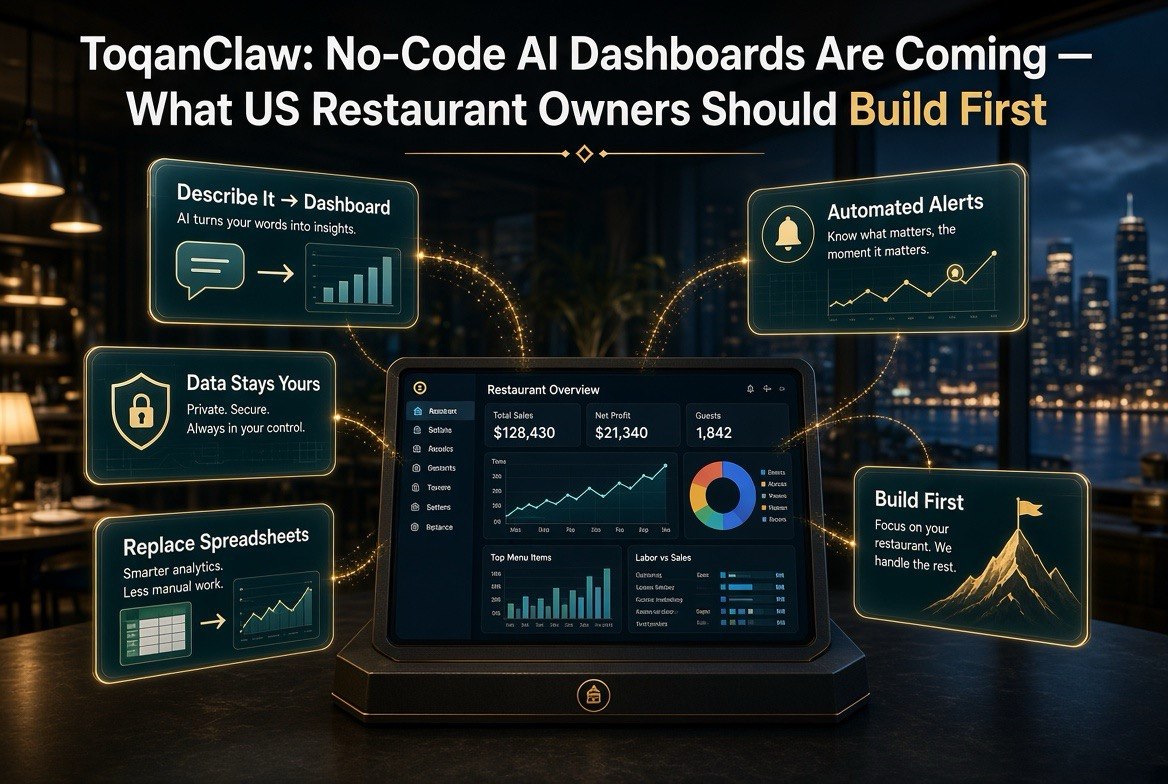
⚡ Expert Summary: Prosus and Just Eat Takeaway just launched ToqanClaw, a no-code AI platform that lets a restaurant owner build custom dashboards, apps, and automated workflows by describing what they need in plain language — no IT team, no engineers, no code. It’s Europe-first today, but it signals what’s heading to US independents. This post shows you the five dashboards worth building first and how to set them up now with the tools US owners already have.
You don’t have an IT department. You don’t have a data team. And right now, that gap between you and the big chains has been the whole story of restaurant technology — the chains buy expensive systems, the independents improvise with spreadsheets.
That gap just started closing.
A platform called ToqanClaw, built by the technology group behind Just Eat Takeaway, now lets a restaurant owner build custom dashboards, apps, and automations just by describing what they need the way they’d explain it to a shift lead. No code. No engineers. No waiting in an IT queue. Data stays under the owner’s control, and it isn’t used to train anyone else’s models.
It’s launching in Europe first. But the message for US operators is clear: the days of “you need an IT team to get good dashboards” are ending. Here’s what’s changing, and the five dashboards you should build first the moment tools like this reach you — or right now with what you’ve already got.
What ToqanClaw Actually Does
Forget the jargon for a second. Here’s the plain-English version.
ToqanClaw is a no-code AI builder aimed squarely at restaurants and small businesses. Instead of hiring a developer to build you a custom dashboard, you describe what you want in a normal sentence — “show me my best-selling items by daypart for the last month” — and the platform assembles it. Same for apps and for automated workflows: tell it what you want to happen when a condition is met, and it builds the flow.
Two details matter for an independent operator. First, no code — you’re not learning to program, and you’re not paying a contractor. Second, data control — the platform routes across AI models for efficiency but keeps your data under your control and out of third-party training. For an owner who’s been careful about handing customer or sales data to every new tool, that’s the difference between “interesting” and “usable.”
ToqanClaw is being rolled out through Just Eat Takeaway’s restaurant partners in Europe. For the US market, treat it as the proof point: no-code AI dashboards are now table stakes, and the template for building them is proven.
Why This Matters for an Independent US Owner
Here’s the honest reality of how most independent restaurants run their numbers today: a POS login, a bunch of spreadsheets, and a lot of gut feel. When you want to know which items are dragging margins, you export data, fiddle with it, and hope you’re reading it right. When you want a repeatable report, you rebuild it by hand every time.
That’s not a failure of effort. It’s a failure of tooling. The chains have paid dashboards and data teams; you have Thursday night and a laptop that’s older than your POS.
No-code AI dashboards flatten that. The whole pitch is: you describe the question you want answered, and the tool gives you a live dashboard that answers it — and keeps answering it every week without you redoing the work. You stop being the person who manually assembles reports and become the person who decides which questions matter, while the tool does the assembly.
There’s no reason to wait for a US launch to act on this. The skills transfer. And plenty of the dashboard patterns below are buildable today with tools US owners already have.
| Today (spreadsheet & guesswork) | With No-Code AI Dashboards |
|---|---|
| Export POS data, clean it by hand, rebuild every report | Describe the report once; it updates automatically every period |
| Spot waste or theft weeks after it happens, in a CSV | Realtime thresholds flag anomalies the day they occur |
| Manually pull competitor/pricing intel when you remember to | A budgeted dashboard assembles the intel you care about |
| Pay a contractor for a one-off custom build you can’t update | Describe a change in plain language; the dashboard updates with you |
The 5 Dashboards Worth Building First
Not every dashboard is worth your time. Skip the vanity metrics. These five are the ones that put money back in the till or stop money leaking out.
1. The Sales-by-Daypart Board
Know exactly where your revenue comes from by day and time slot. Which daypart is carrying the week? Which is silently dying? This dashboard turns “Thursday feels slow” into “Thursday lunch is down 11% versus last month, and it’s driven by these three items.” You can only fix what you can see clearly.
2. The Item-Level Margin Board
This is the one that pays for itself fastest. Sales are vanity; margin is reality. A dashboard that shows you each menu item’s food cost, sell price, and true contribution per plate — by daypart and by week — lets you kill the losers and promote the winners with data instead of a hunch. Most owners are shocked at which items are actually losing money.
3. The Labor-to-Cover Board
Labor is your biggest controllable cost after food. A dashboard that tracks labor percentage against covers in near-realtime shows you where you’re overstaffed on slow days and understaffed when the rush actually hits. It’s the difference between scheduling on guesswork and scheduling on a live picture of what the week is doing.
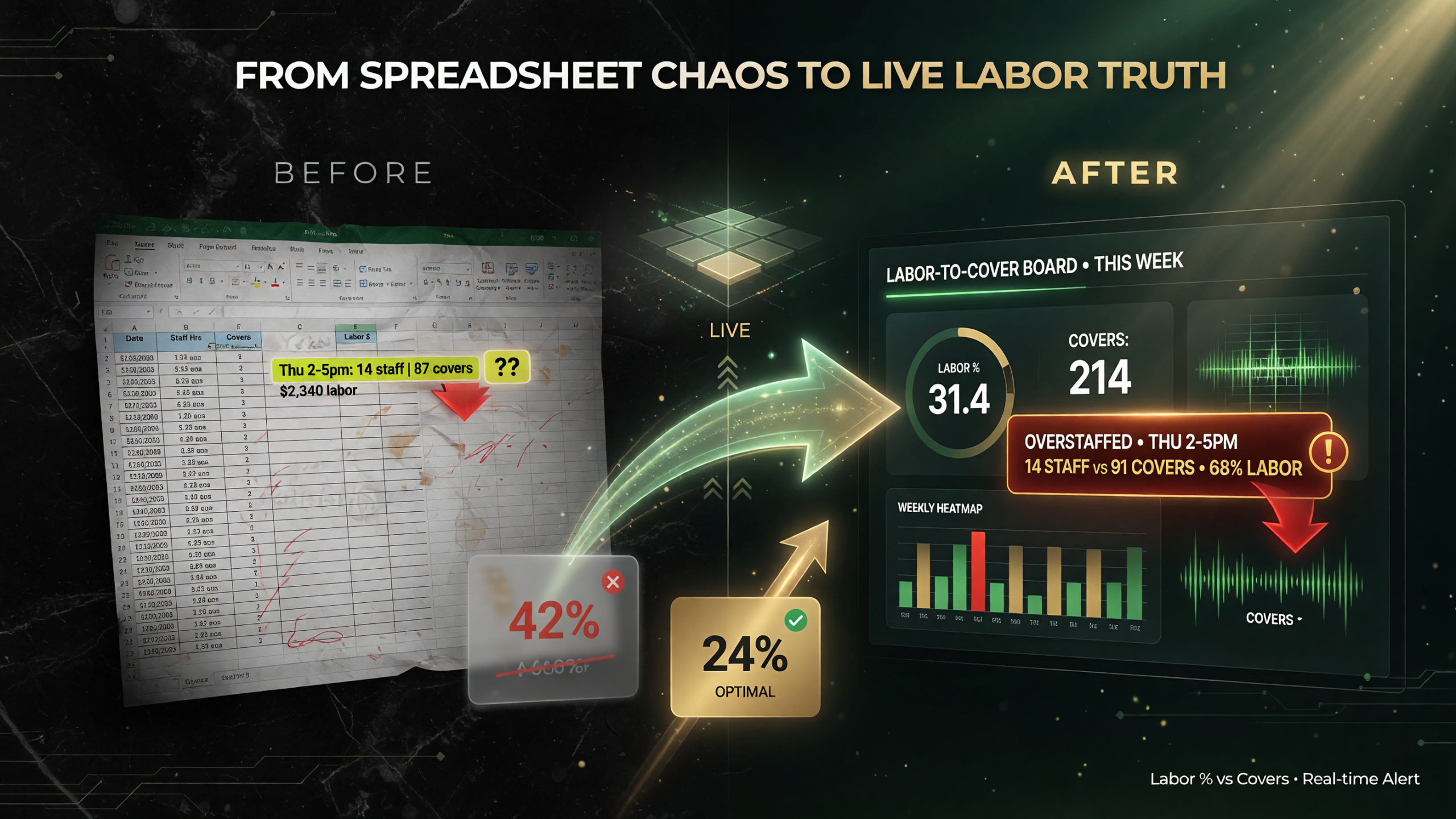
A labor-to-cover board turns scheduling guesswork into a live picture: track labor percentage against covers in near-realtime and the overstaffed slow daypart jumps out instead of hiding in a spreadsheet.
4. The Waste-and-Variance Alerts Board
Food waste and inventory variance are where margins disappear quietly. A dashboard that flags anomalies — “tonight’s chicken usage is 18% above the running average for a Tuesday” — catches theft, spoilage, or prep errors on the night they happen, not in a spreadsheet a month later. If you’ve got a walk-in full of mystery, this is the board that explains it.
5. The Guest-Feedback Summary Board
You get reviews across Yelp, Google, and your own surveys. Reading them all is a part-time job you don’t have. A dashboard that summarizes the themes — pricing complaints up, service praise steady, one recurring kitchen issue — lets you act on the signal instead of drowning in individual comments. This turns scattered feedback into a weekly action list.
| Dashboard | It Answers | Why It Pays Off |
|---|---|---|
| Sales by daypart | Where is revenue actually coming from? | Spot dead slots and double down on what works |
| Item-level margin | Which items truly make money per plate? | Kill losers, promote winners, lift overall margin |
| Labor to covers | Are we staffed to the actual business? | Cut overtime and overstaffing without understaffing |
| Waste & variance alerts | Where is food going missing or spoiling? | Catch theft and spoilage the day it happens |
| Guest feedback themes | What are guests actually telling us? | Turn scattered reviews into a weekly action list |
How to Build These Today (Even Before the New Tools Arrive)
You don’t have to wait for ToqanClaw or a US equivalent to start. Most restaurants already own software that can do most of this, and the no-code pattern transfers wherever you build it.
For the full library of AI tools built for restaurant owners, our AI in restaurants hub collects them all in one place.
Start with your POS. Most modern POS systems export the daypart and item-level sales data you need for dashboards 1 and 2. Your scheduling software tracks labor hours against the sales your POS records — that’s dashboard 3. Inventory and variance numbers live in whatever you use for ordering and par levels — that’s dashboard 4. And your review data all sits in one or two places you already check — that’s dashboard 5.
Then pick one dashboard and build it with a spreadsheet or a simple no-code tool: set the columns, connect the export, and make it repeatable. Even a semi-automated version beats the current habit of spot-checking a CSV when something feels off.
The point isn’t the tool. The point is building the habit of watching live numbers instead of reacting to surprises. Once that’s in place, adopting a no-code AI dashboard platform later is simply a faster, cleaner version of what you already do.
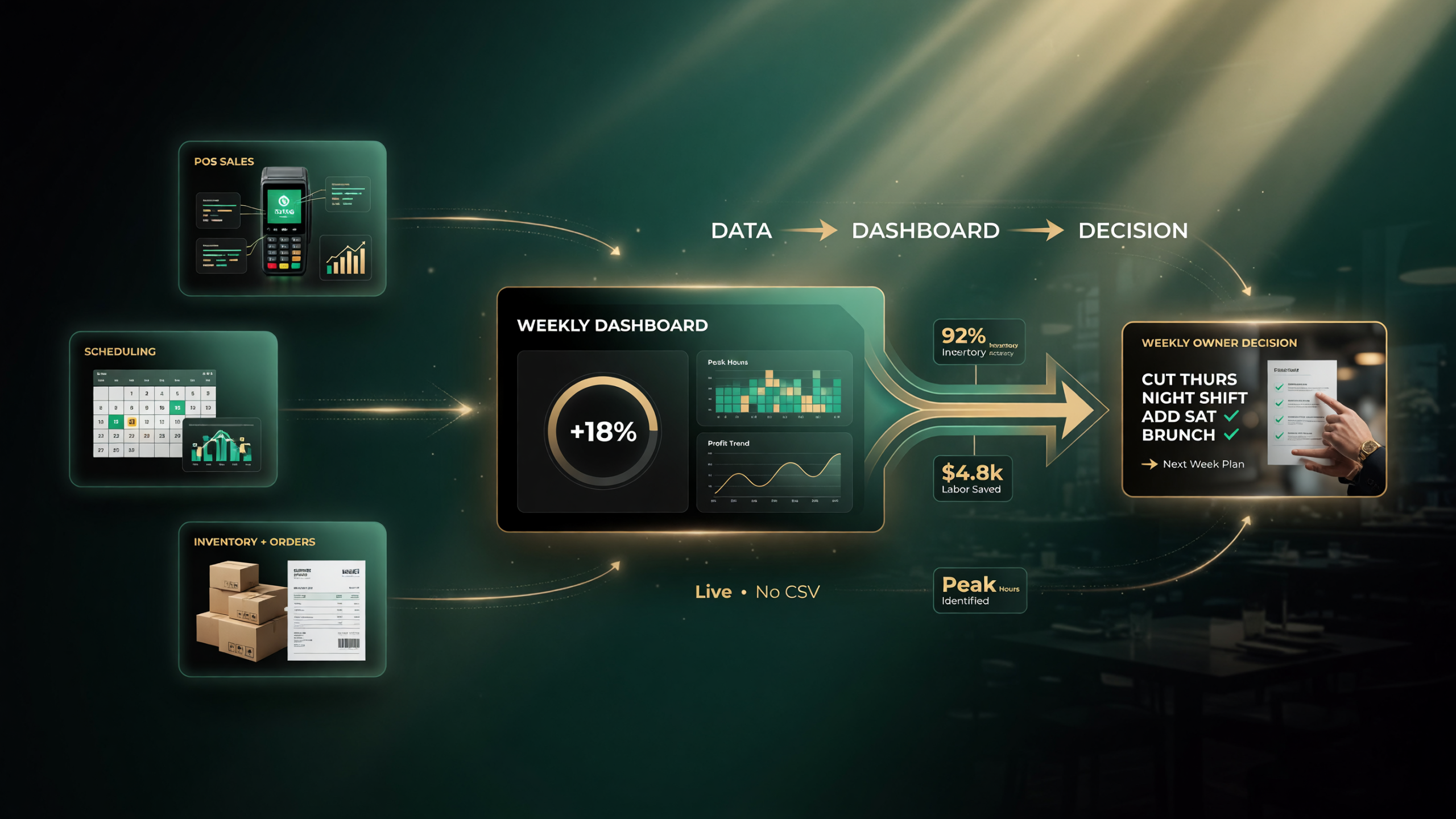
You already own the data: POS exports feed dashboards 1 and 2, scheduling software feeds the labor-to-cover board, inventory feeds variance alerts, and reviews sit where you check them daily. A no-code dashboard just assembles it into a repeatable weekly review.
Where the Hype Meets Reality
I’m not going to oversell this. No-code AI dashboards are genuinely good news for independents, but there are real limits.
Garbage in, garbage out. A dashboard is only as good as the data feeding it. If your inventory counts are sloppy and your staff don’t punch in accurately, a beautiful dashboard just makes your bad data look official. Fix the data hygiene first, or the dashboard will lie to you confidently.
You still have to make the call. A dashboard tells you the chicken variance is up 18%. It doesn’t decide whether that’s theft, spoilage, or a pricing error — and it doesn’t fire the person responsible or fix the walk-in. The tool informs; the owner decides.
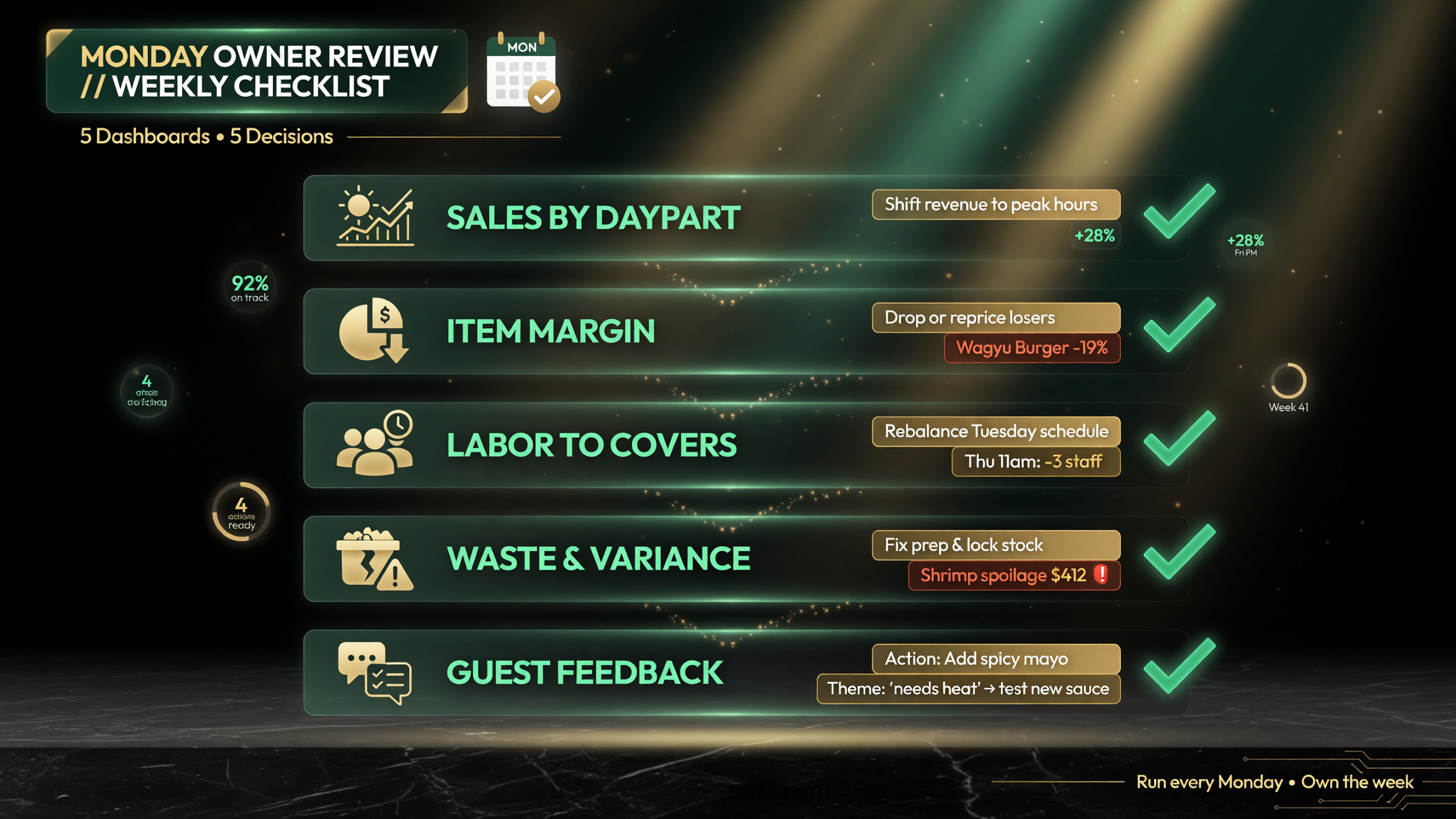
Build the habit, not just the tooling. A standing Monday review across the five boards — sales by daypart, item margin, labor to covers, variance alerts, and review feedback — turns live numbers into one decision each, and it pays for itself the first quarter it catches a waste leak or a margin-dragging dish.
Adoption needs the team. If your managers don’t look at the dashboard, it’s a costly screensaver. The ones that pay off are the ones embedded in a weekly habit — a standing Monday review where the board drives the conversation, not an optional extra.
The independent owner who treats these as a decision tool — not a magic machine — is the one who actually profits.
What It Realistically Costs You
Let’s put a number on this so it’s not vaporware. The honest range depends on how much you build yourself versus what you push to a paid platform, so think of it as a ladder rather than a single price.
At the low end, a spreadsheet-based dashboard costs you nothing but a few hours of setup — you’re already paying for the POS and scheduling software, and the data is already there. You’re just organizing it into a repeatable view. For a first dashboard, this is the smart move: it costs no new subscription, proves the habit, and tells you whether the numbers actually change a decision you make.
The middle rung is a no-code tool with a modest subscription — typically the same ballpark as a third-party POS add-on or a nightly music-licensing fee, not a new hire. At that level you get the automation: the dashboard refreshes itself, alerts fire on anomalies, and you don’t rebuild reports by hand. This is where most independent owners should land once the spreadsheet version proves out.
The top rung is a fully built-out platform like the one Prosus and Just Eat Takeaway are rolling out, where you describe what you want and it assembles the whole pipeline. That’s priced for restaurants that already rely on data daily, and it’s overkill until you’ve built the habit on the lower rungs.
Here’s a fair way to judge the spend: if a dashboard helps you catch one recurring waste leak, one overstaffed daypart, or one margin-dragging menu item per quarter, it has paid for itself many times over. A single margin fix on a popular but unprofitable dish is usually worth more than the full year of subscription. The question isn’t whether you can afford it — it’s whether you’ll actually look at it and act.
Frequently Asked Questions
What is ToqanClaw and who built it?
ToqanClaw is a no-code AI platform launched by Prosus and Just Eat Takeaway that lets restaurants and small businesses build custom dashboards, apps, and automated workflows by describing what they need in plain language, without code or an IT team.
Is ToqanClaw available in the United States?
ToqanClaw is currently rolling out to Just Eat Takeaway’s restaurant partners in Europe. It’s not yet broadly available to US operators, so US owners should treat it as a signal of where the market is heading and start building the underlying dashboard habits now.
Do I need to know how to code to build AI dashboards?
No. No-code AI dashboard platforms are built for non-technical operators. You describe what you want in a normal sentence and the platform assembles the dashboard, app, or workflow for you.
What are the most important dashboards for a restaurant owner?
The five highest-value ones are: sales by daypart, item-level margin, labor to covers, waste and variance alerts, and guest-feedback themes. Together they cover revenue, profitability, labor, shrinkage, and guest satisfaction.
Are no-code AI dashboards worth it for a small independent restaurant?
Yes, if the data feeding them is accurate and you actually review them weekly. They close the intelligence gap with big chains by replacing manual spreadsheets with live, repeatable reports — but they inform decisions rather than making them.

About Barak Schurr
Barak Schurr built and exited a major ticketing platform, ran global operations at Eventbrite, and now focuses on one question: which AI tools actually help independent restaurant owners run leaner and grow faster. He writes from the operator’s perspective — no vendor spin, no theory, just what’s real in 2026.
Email: [email protected]
More AI Resources for Your Business