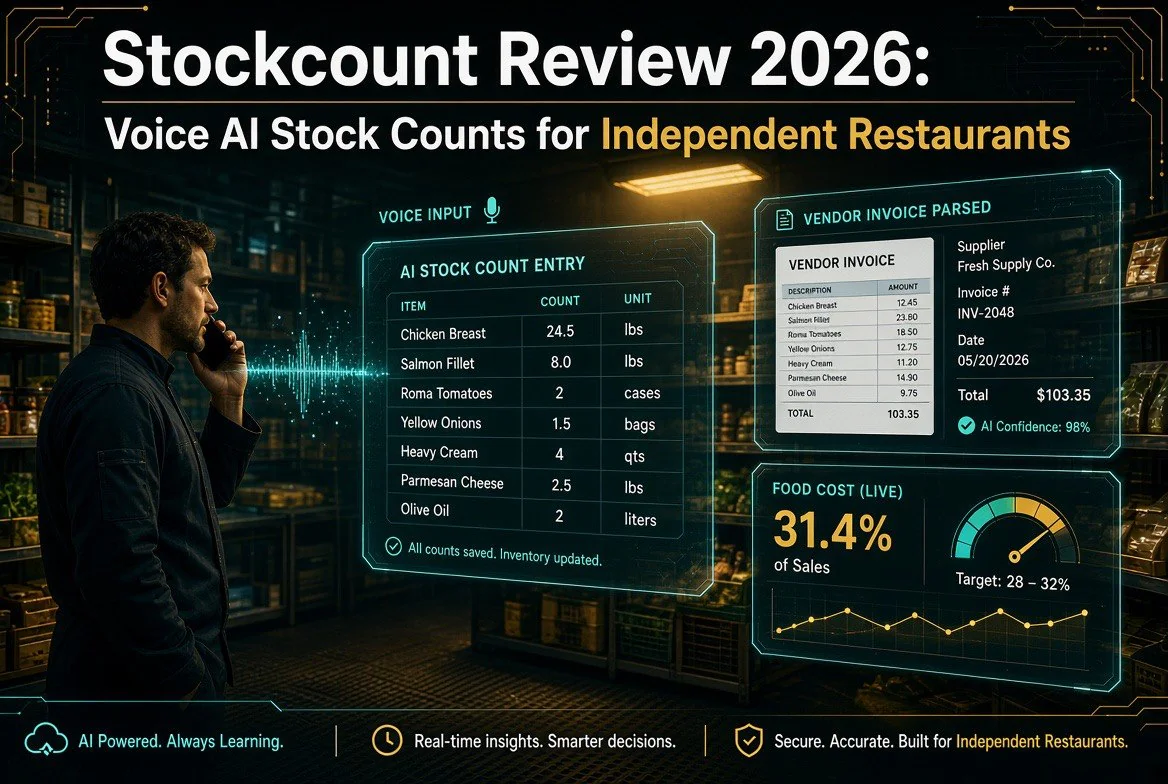
Stockcount Review 2026: Voice AI Stock Counts for Independent Restaurants
⚡ Expert Summary: Stockcount attacks restaurant inventory from the one place every other system ignores: the typing. You walk the walk-in with your phone in your pocket and say what you see — “two cases romaine, half a bag of flour, six cartons eggs” — and a voice agent turns it into a structured count. Photograph the vendor invoice on the receiving dock and an AI parser pulls the line items, pack sizes, and unit costs. Out comes a food cost number computed from your own numbers. It starts at $49/month and it is built for the owner-operator running one or two locations, not a multi-unit group with a back-office team.
Every independent operator knows the ritual. Close the kitchen, grab the clipboard, walk the walk-in, and write down forty numbers in the dark. Then sit at the office desk and key those forty numbers into a spreadsheet. Then find the stack of vendor invoices, and key those in too — every line item, every pack size, every price. Two hours later you have a food cost percentage that is already three days old.
That is the job Stockcount was built to delete. Not the counting — the counting is the part where you look at your actual shelves, and no software can see inside your walk-in. The part it deletes is the keying. The clipboard, the spreadsheet, the transcription, and the errors all three of those introduce.
Why Restaurant Inventory Has Always Been a Data-Entry Problem
Here is the uncomfortable truth about inventory software: the systems were never bad at math. They were bad at getting numbers in. Legacy platforms priced at $200 to $500 a month were designed for multi-unit groups with a dedicated back-office person whose entire job was feeding the system. A single-location independent was never the customer — and the price and the workload both said so.
So independents did what independents do. They used a spreadsheet, because a spreadsheet is free and flexible and works fine right up until the moment someone has to maintain it. And the maintenance is exactly what never happens. Two weeks of missed counts and the number in the spreadsheet stops meaning anything, and once it stops meaning anything, nobody opens it again.
AI changes the economics of that specific step. If the count comes in by voice and the invoices come in by photograph, there is no keying left to skip. That is the entire shift, and Stockcount is one of the first tools built specifically around it rather than bolting voice onto a system designed for keyboards.
What Stockcount Actually Does
Three features carry the product, and it is worth understanding what each one replaces in your week.
Voice AI counting. The voice agent turns spoken counts into structured inventory. You walk the walk-in and talk: “two cases romaine, half a bag of flour, six cartons eggs.” It accepts partial counts as you say them — if you say “about half,” it records about half rather than forcing a decimal you do not know. It works hands-free with the phone in your pocket, which matters when both hands are holding a case of tomatoes. Every count is timestamped and attributed, so if your prep cook did Tuesday’s count you know that without asking.
AI invoice scanning. This is the feature that quietly does the most work. You photograph the invoice on the receiving dock, or upload the PDF later when the office pile gets too tall. The parser extracts line items, pack sizes, and per-unit costs, then pushes those into ingredient cost, recipe cost, and food cost percentage downstream. It flags price increases over 15% before they move your margin, and it operates on graduated trust — the more accurate it proves on a given vendor, the less review that vendor’s invoices require.
AI chat agent. A chat agent sits on top of your own data. Ask what your food cost was last week, which items drifted out of target, or what you should order before the weekend. It answers from your actual numbers rather than general knowledge, and it can make the change when you ask it to. Anomalies arrive in a daily digest rather than as a stream of alerts, which is the right call — nobody needs a push notification because the avocado count looked odd on a Tuesday.
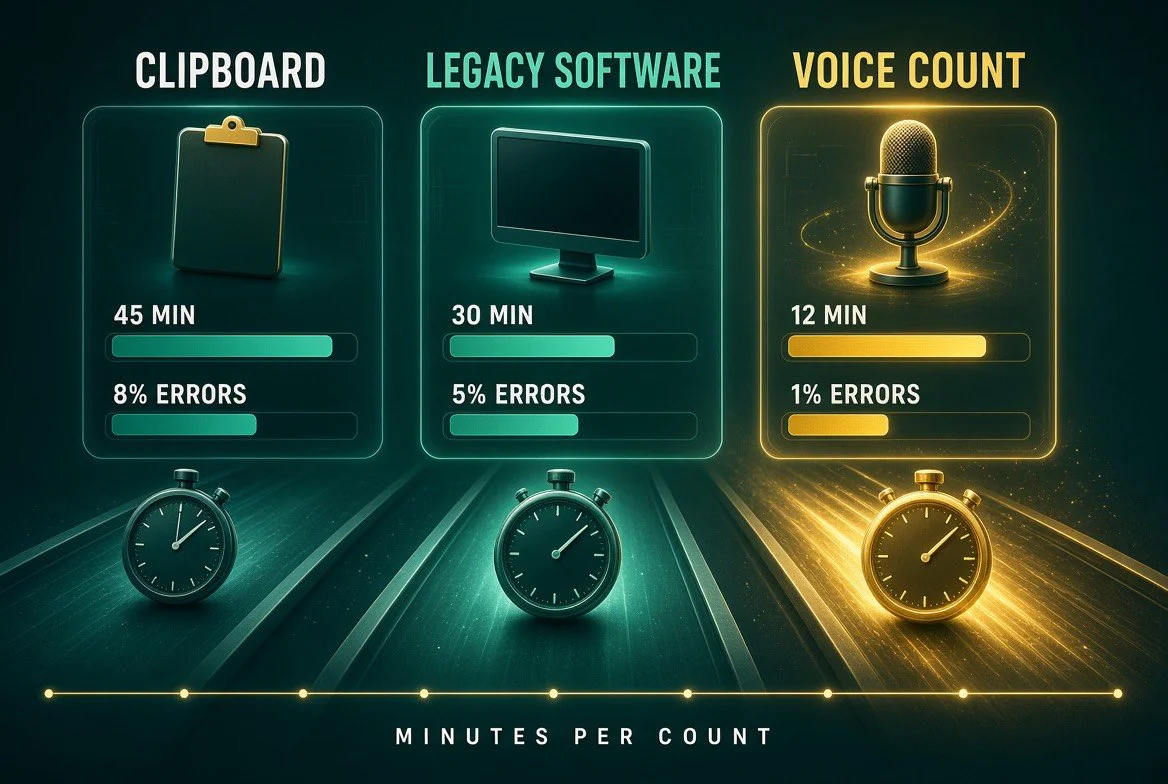
Same count, three methods: the clipboard eats 45 minutes and still misses 8% of entries, legacy software gets you to 30 minutes, and voice counting lands at roughly 12 minutes with next to no entry errors — because nothing gets typed twice.
Voice Counting vs Clipboard vs Legacy Inventory Software
The comparison that decides whether this is worth $49 a month is not Stockcount vs another AI tool. It is Stockcount vs what you are doing on Sunday night right now.
| Task | Clipboard + Spreadsheet | Legacy Inventory Platform | Stockcount |
|---|---|---|---|
| Counting stock | Write it down, key it in later | Type each line into a sheet or app | Speak it — the voice agent structures the count |
| Entering invoices | Hand-key every line item, or skip it entirely | Hand-key every line item | Photograph it — AI parses the lines and pack sizes |
| Finding a problem | You notice it, or you never notice it | You scan the reports yourself | Anomalies surfaced in a daily digest |
| Getting an answer | Rebuild the formula, hope it is right | Build the report, then read it | Ask the chat agent in plain language |
| Typical monthly cost | “Free” — paid in hours you do not have | $200-$500+ per month | From $49 per month |
Notice what the middle column actually costs you. A legacy platform at $300 a month does not save the keying — it formalizes it. You pay six times more for the privilege of typing into a nicer interface. The spreadsheet column is not free either; it costs you the two hours, and it costs you the accuracy, and eventually it costs you the whole habit.
Count by Talking: What Changes on a Tuesday Night
The reason voice matters more than it sounds like it should is that it moves the count to where the count physically happens. A keyboard is at the desk. Your stock is in the walk-in, the back bar, and the dry storage room. Every clipboard-and-spreadsheet system asks you to be in two places, and every one of them therefore gets done late, partially, or not at all.
When counting is talking, it happens while you are standing in front of the product. That has three practical consequences for an independent operator.
Counts happen more often. A count that takes fifteen minutes gets done weekly. A count that takes two hours gets done monthly, or when someone finally gets annoyed enough. Weekly counts catch a drifting food cost while it is still a small problem instead of a quarterly surprise.
Someone else can do it. The barrier to delegating a count has always been the data entry — you cannot hand a clipboard to a prep cook and trust that forty numbers will arrive clean in the spreadsheet. Voice removes the transcription, and the timestamp and attribution record who counted what, so delegation stops being a leap of faith.
The number is current. Food cost is beginning inventory plus purchases minus ending inventory — real counts, real invoices, recalculated whenever either changes. A stale count produces a stale percentage, and a stale percentage produces decisions you would not have made with good information.
For bars, the same mechanic applies to back-bar counts and pour cost, which is a category where shrinkage has traditionally been nearly invisible because counting bottles by hand is so tedious that nobody does it often enough to see the pattern.
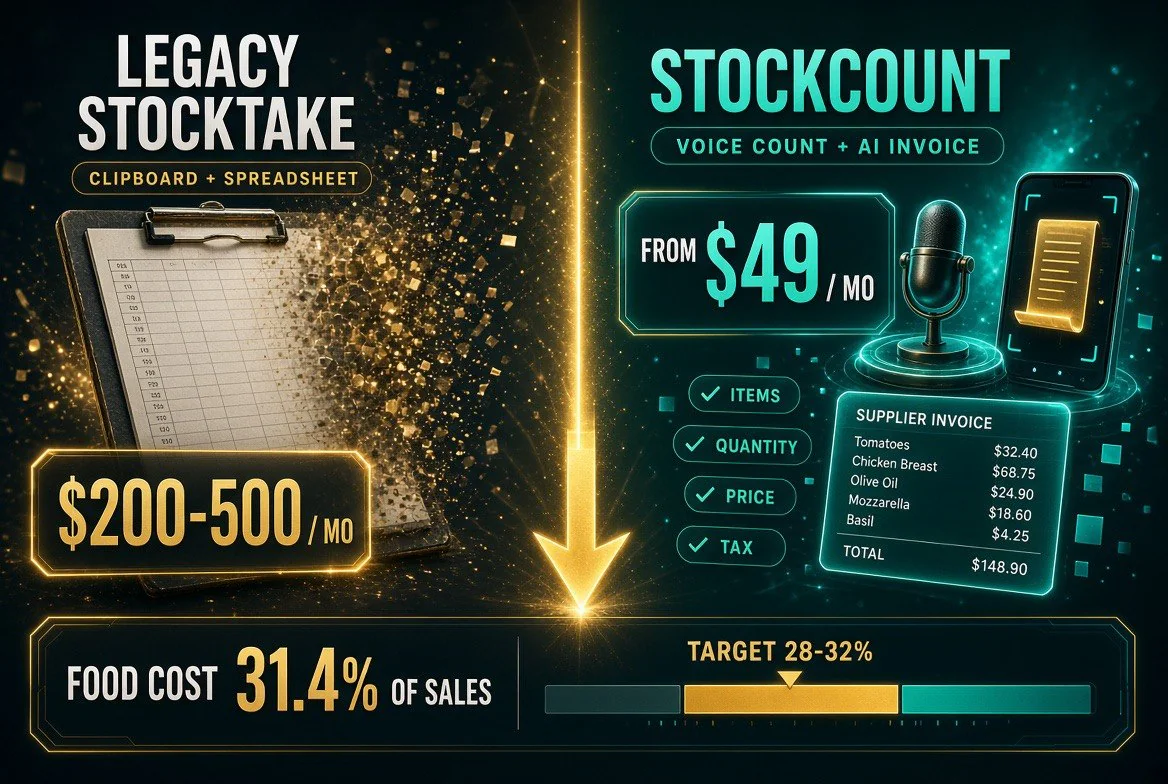
What the switch actually costs: legacy stocktake systems run $200–500 a month, while Stockcount starts at $49 — and the food-cost gauge on the bottom is the number that pays for it, with 31.4% of sales against a healthy 28–32% target band.
What Stockcount Costs — and What It Replaces
Pricing starts at $49 per month, month-to-month, cancel anytime. Plans scale by location and volume rather than the flat enterprise rate that legacy systems charge. Compared directly, the gap is not subtle:
| Factor | Stockcount | MarketMan |
|---|---|---|
| Starting price | From $49/month | Higher entry tier; pricing quoted per location |
| Counting method | Voice — speak the count hands-free | Type or scan into the app |
| Invoice handling | Photo or PDF, AI parses lines and pack sizes | Invoice entry and reconciliation tools built for groups |
| Target operator | Single or two-location independents | Multi-unit groups with a back office |
| Contract | Month-to-month, cancel anytime | Annual agreements common |
Run the honest math on one number first. A two-point improvement in food cost on $40,000 a month in food purchases is $800 a month. Stockcount costs $49. The tool does not create that improvement by itself — it creates the visibility that lets you find it. But that is the trade you are making, and it is a cheap one.
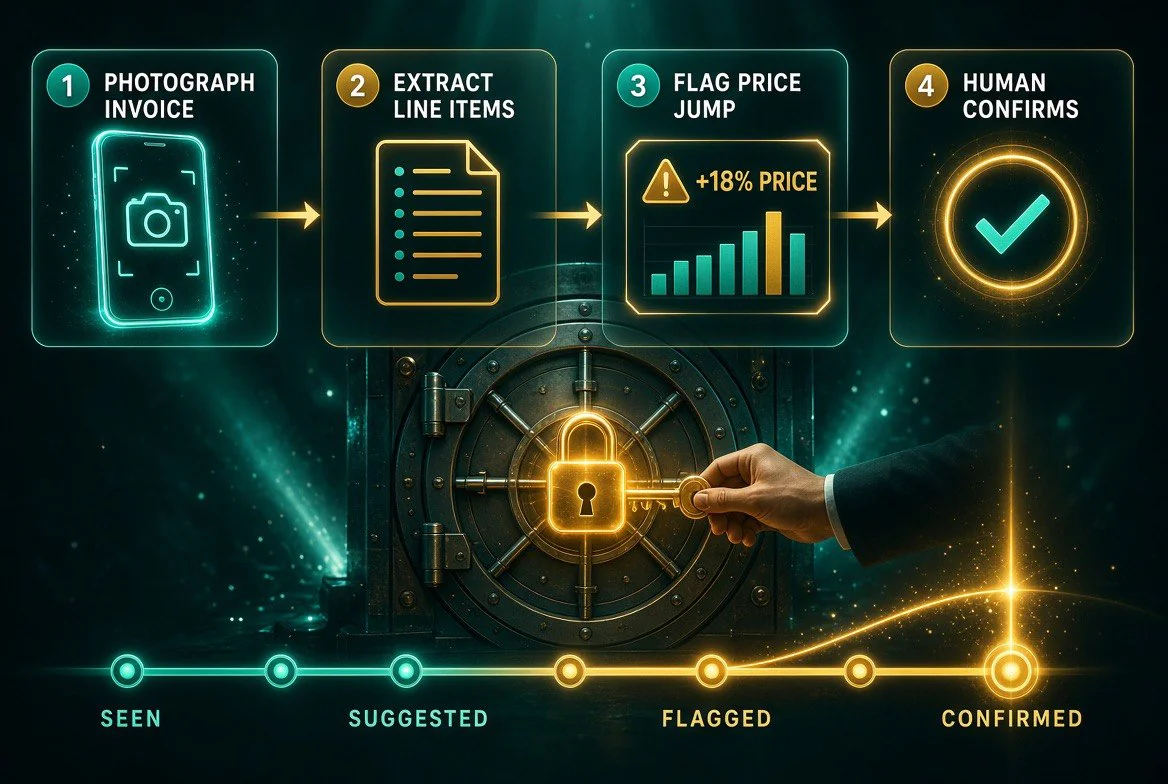
Why the numbers stay trustworthy: the AI only reads what is printed on the invoice, flags any price jump over 15% for a human to accept or reject, and earns more automatic trust only after repeated confirmations.
Why the AI Doesn’t Guess Your Numbers
The fair objection to any AI in your books is obvious: language models make things up. A general-purpose chatbot asked about your food cost will produce a confident number that has nothing to do with your restaurant, because it is answering from pattern rather than from data.
Stockcount is built the other way around. It only quotes numbers computed from your own counts and invoices. When a detail is missing, it asks rather than filling in a plausible value. COGS is measured — beginning inventory plus purchases minus ending inventory — not reasoned about. It learns your vendors’ pack sizes from your own invoices, which is why it knows that your avocados arrive as a five-count bag from one supplier and a case from another. And that knowledge accumulates: your items, your words for them, your vendors’ rhythms. A fresh chatbot session starts from zero every time.
That distinction — measured versus inferred — is the single most important thing to check before trusting any AI tool with your food cost, and it is the reason an inventory-specific tool beats a general assistant for this job.
What It Won’t Do
Three boundaries worth knowing before you sign up.
It will not count for you. Someone still has to walk the walk-in. The tool removes the transcription, not the physical act. If nobody in your building is willing to spend fifteen minutes a week with a phone in their pocket, no software solves that.
It is not a full POS replacement. Stockcount covers inventory, invoices, and food cost. It is not your ordering system, your scheduling tool, or your sales reporting. It is designed to sit alongside what you already run rather than replace the whole stack.
Accuracy depends on what it is given. The AI captures what you say and what your invoices show, accurately. It does not invent counts. If you tell it “some romaine,” you get “some romaine.” Voice removes friction from counting, but it does not remove the need to count carefully.
The Bottom Line for Independent Operators
Food cost is the number most responsible for whether an independent restaurant survives a soft quarter, and it is the number most independents track worst — not from laziness, but because the tracking system demanded two hours of data entry nobody had. That was a design failure in the software, not a discipline failure in the operator.
Stockcount fixes the design failure at the point where it existed. Voice counting and photographed invoices remove the keying, which removes the reason the habit dies. At $49 a month, built for one or two locations, priced and designed for the operator who is also the chef and the office manager, it is the first inventory tool in years that is aimed at the person actually doing the count.
If you want to see how this fits with the rest of your operation, our breakdown of AI tools that cut restaurant labour costs covers the wider stack, and our restaurant AI tools hub indexes every platform we have reviewed for independent kitchens.
Frequently Asked Questions
What is Stockcount?
Stockcount is AI inventory management software built for independent restaurant operators. It uses a voice agent to turn spoken counts into structured inventory, an AI parser to read photographed or uploaded vendor invoices, and a chat agent to answer questions about cost, variance, and ordering — all from your own data. Plans start at $49 per month.
How does voice counting work in a walk-in cooler?
You keep your phone in your pocket and say what you see: “two cases romaine, half a bag of flour, six cartons eggs.” The voice agent converts the speech into structured inventory lines, accepts partial counts like “about half” as spoken, and automatically timestamps and attributes each count. It is hands-free, which matters when both hands are full.
Can AI really read my vendor invoices accurately?
Photograph the invoice on the receiving dock or upload the PDF later. The parser extracts line items, pack sizes, and per-unit costs, then updates ingredient cost, recipe cost, and food cost percentage downstream. It flags price increases over 15% before they affect margin, and it applies graduated trust — the more accurate it proves on a vendor, the less review that vendor’s invoices need from you.
How much does Stockcount cost compared to legacy inventory software?
Stockcount starts at $49 per month on month-to-month terms you can cancel anytime. Legacy restaurant inventory platforms typically run $200 to $500+ per month, because they were built for multi-unit groups with a dedicated back-office. The AI removes the manual data entry that made those systems labour-heavy, which is what makes the lower price possible.
Do I need technical skills or special hardware to use it?
No. There is no spreadsheet to maintain, no barcode hardware to buy, and no training course. The interface is talking and taking photos — two things every restaurant employee already does all day. Most operators are counting by voice on their first morning.
Does Stockcount replace my POS system?
No. Stockcount covers inventory counting, invoice parsing, recipe costing, and food cost tracking. It is not a POS, a scheduling tool, or a sales reporting platform. It is designed to sit alongside the systems you already run and supply the food cost number those systems do not give you.

About Barak Schurr
Barak Schurr built and exited a major ticketing platform, ran global operations at Eventbrite, and now focuses on one question: which AI tools actually help independent restaurant owners run leaner and grow faster. He writes from the operator’s perspective — no vendor spin, no theory, just what’s real in 2026.
Email: [email protected]
More AI Resources for Your Business